[tweetmeme source=”usabilitygal” only_single=false]
After reading 100 outstanding login forms, I was surprised just how bad a lot of login forms were in terms of usability! Do these people not want users to login to their sites? So i’m going to pick on a few of them and you’ll see what makes a login form good, bad and just downright ugly.
The Good

This is how it’s done guys. Why is this form so good?
- Clear title ‘Member Sign In’
- Clear labelling of username and password fields
- Nice big call-to-action ‘Sign in’ button.
- Button to ‘Register’ in case the user pressed sign in by mistake.
- Links for both forgotten username and forgotten password
- Clean page keeps the users focus on the task.
The Bad

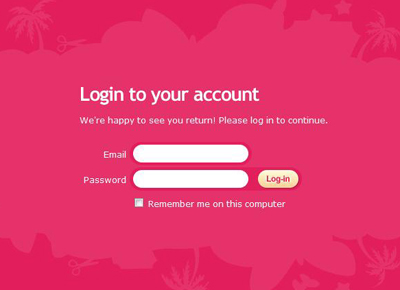
Oh my! There’s pink and then there’s PINK! So, firstly this hurts your eyes doesn’t it? The smaller white text is also quite difficult to read because the pink overwhelms it, diluting the white so it actually looks like a light pink (poor readability). There is no help for if you have forgotten which email address you used to sign up to the site. There is no help if you have forgotten your password. There is no link to the sign up page. And if we’re going to be picky, we could point out the inconsistency between the way they have spelt ‘Login’ in the title, ‘log in’ on the first line and ‘Log-in’ on the button.
The Ugly
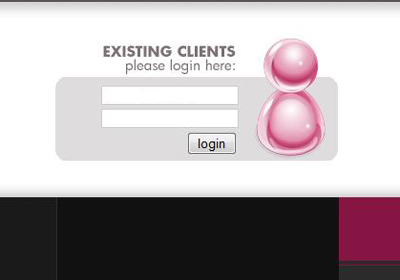
Oh dear! This doesn’t even look finished does it? There is no indication of what the user should type in which field. There is no help at all for forgotten login details or password. In fact there is no link to any kind of help at all! When we say ‘keep it simple, keep it usable’ we don’t mean to this extent!
What I noticed on a lot of the login forms was a lack of help for users who may have forgotten their username or the email address they used to sign up. There were plentiful links for forgotten passwords. These days users have multiple email addresses and usernames so it’s good practice to include help in your login form for if they forget which one they used.
Just another before you go…. The Confusing!
Hmmm can you work this one out? ‘Keep me logged in until I log out’. Isn’t this how sites normally work on the internet, i.e. you login to a site and you stay logged in until you press the logout button. So why is there a checkbox? Does this mean that if you don’t tick the box, when you press the logout button, you won’t actually be logged out?



 Lisa Duddington