FREE amazing UX poster: the user experience machine

Keepitusable have produced a fab, fun and importantly, free ux poster as a very early little christmas present to you all. don’t worry, you don’t need to enter any personal details at all to download it, just click the image below then hit the big pink button to download your copy. alternatively, if you’d like a hard copy poster version to display by your desk, head over to their deviantART page.

free user experience ux poster

What is the optimal line length?

There isn’t one.

It depends on whether you want your users to read the page faster or you want them to like the page.

Research by Dyson (reference below) showed that users read web pages faster at an optimum length of 100 characters and longer. However, when asked, they prefer shorter line lengths and believe they read these faster (even though they don’t).

Dyson, M.C. (2004). “How Physical Text Layout Affects Reading from Screen.” Behavior & Information Technology, 23(6), pp. 377-393

iPad. How tablets will change the web

The waiting is over! Apple have just announced their much anticipated tablet, iPad. What do you think? Will you be getting one?

Context of use

I did wonder what the purpose of tablets were. What do they give you that a laptop and mobile don’t? The answer is portability, speed, lightness and a large direct touch interface. In my opinion, tablets will be used primarily for personal use in the home, such as lounging round on the sofa surfing the net, playing games or reading an e-book (use cases whereby a laptop would be too bulky but a phone wouldn’t give you the screen size to enjoy the task). The iPad is perfectly aimed at the majority of home users who just need a device for web surfing, playing music, watching movies, storing photos, playing games and more fun stuff!

How tablets will change the internet

Web pages are currently designed for mouse-based scrolling interaction. Most users have mice with scroll wheels. This makes scrolling quick and efficient, so web pages are often designed to be scrollable, thereby fitting more content onto a single page.

Tablets require a different interaction paradigm due to their touch user interface. To use the flicking gesture to scroll would be tiresome, frustrating, even dizzying on a large device such as the iPad. The ideal interaction style for a touch tablet is for the whole web page to fit the tablet screen, the user then sees an overview of the page and can zoom in to the areas they are interested in.

Apple have priced the iPad very competitively, they want the iPad to be a household device. Judging from the comments i’ve seen so far on Facebook and Twitter, people want one! It really could be the next big thing.

Be prepared, if it is as successful as the iPhone, you will need to think about the design and interaction of your website to make it more ‘tablet-friendly’.

Tablet-friendly design:

– Remove (or limit) scrolling
– Each page fits the tablet screen space (remembering portrait and landscape modes)
– Design for a ‘zoomable’ interface
– Think finger-friendly hit areas
– Don’t overcrowd the page. Draw the user to where you want them to click by using space, pictures and larger text size.
– Don’t make text titles too small. Users should be using the ‘zoom in’ action because they want to read more, not because they can’t read the text.

More on the iPad to come!

Google – keeping it simple

Have you noticed that for some time now Google have been gradually adding more and more links to their homepage? This is typical ‘Feature creep‘ and unfortunately happens a lot.

Feature creep is when “extra features go beyond the basic function of the product and so can result in over-complication, or “featuritis”, rather than simple, design” (wikipaedia).

Google became the best search engine because of it’s simplicity. Think about it…what do you users really need on a search engine site? Strip it right back and all they actually need is a search box to type in and a button to press to get the results. They aren’t distracted by unnecessary clutter. They have one aim and they can perform it efficiently and effectively, achieving greater satisfaction.

However, even Google hasn’t managed to escape the dreaded ‘feature creep’. Recently it had begun to look like this:

Disappointing hey? The once simple site has become crowded with links.

BUT fear not! Google have recognised their featuritis and have tackled it head on with a rather ingenious solution. Now when you go to Google, it’s like going back in time to the old days when there was just a big search box and button. This is what you see:

Doesn’t it feel good? Very very simple. The cursor is positioned inside the search box so all the user needs to do is type and hit the return key or the search button. However, what about all the other features? Surely some of them were useful? Yes they were. Now for the clever part…. if the mouse is moved even slightly all the extra features fade in (via a nice transition). They are there if the user needs them.

Why does this work?

If the user wants to quickly search it is most likely they are poised ready to type as soon as the google page loads up. By positioning the cursor inside the search box, there is no need to touch the mouse. Users going to Google primarily to search have an excellent experience. Simple, fast and effective.

Users going to Google to do anything other than search will be used to having to use their mouse. Their existing mental model involves using the mouse. They may be slightly surprised upon seeing the new screen, but one tiny movement and the hidden features appear.

Search use case – keyboard focussed

Other use cases – mouse focussed

The new design provides a good fit between the interaction style of the user and the site behaviour.

Poor user experience with Orange leads to a happy Vodafone customer

Today, I’m going to tell you a story of a frustrating user experience that I had with Orange but which resulted in a happy ending between me and my new friend, Vodafone.  
Picture 2


My personal phone contract is with O2. I took it out many months ago before I moved into a house in which it is impossible to get a signal without standing on one leg, waving your arm out of the window and threatening it with physical abuse if it doesn’t connect SOON! This wasn’t a problem before when I had a work sim with Orange but since being made redundant I had to rely solely on my O2 sim. Anyway, I finally had enough and today dug out an old pay as you go Orange sim from the back of a draw and decided to activate it to use as a second sim.

I initially visited the Orange website listed on the card to activate it, however, the link was dead and showed the page no longer existed. It didn’t redirect me to an updated page so instead I called the freephone number and got through to an automated system where a friendly sounding female voice welcomed me (let’s call her Jane to make it easier). However, after welcoming me, Jane decided not to speak to me at all even though I could see she was still on the line. After about 10 seconds I decided something must have gone wrong so I hung up and called her back. This time I realised why she was silent. She had asked me a question and I had to answer yes or no, however as I was walking down the stairs the first we talked, I hadn’t heard say this part. When she didn’t repeat herself or mention that she couldn’t hear me I thought she had left the conversation.

Anyway, now we were back on speaking terms and she sounded very friendly. She would even tell me when she was entering my details into the system and I could hear her typing (very realistic). I had to go through several menus and tell Jane certain details like the IMEI number of the phone I’d be using (I didn’t really understand why she needed this and I hadn’t actually decided which of my phones to use yet but I gave her one anyway as she sounded trustworthy). It was a process that was lengthy enough for me to hope that Jane accepted all the details and did not transfer me to someone to redo it all again or end the call. 

Jane asked me if I now wanted to set up an ‘animal call plan’. A what??? Animals? What have they got to do with call plans? I had absolutely no idea what she was talking about and it sounded like it was going to be a lengthy task to go through all the plans to choose the best one so I thought I’d read up on this later after I’d activated the sim card. So I told Jane ‘No’. She was obviously really offended by this and very abruptly told me I couldn’t continue with the process, goodbye and hung up on me without giving me any options at all. How rude of her! She went so quickly from liking me to hating me. Well I don’t need friends like that thankyou so I went to visit Jane’s friend Vodafone down the road. I was quickly sorted with a sim that activated without needing any details such as an IMEI number  (hmmm I knew that Jane shouldn’t be trusted) and I have the best signal ever at home. I am a very happy Vodafone customer. 

What did Jane do wrong?

1. When I didn’t hear her she didn’t repeat herself or ask if I needed help.

2. Asked me questions that made me question her trustworthiness. Why did she need to know the IMEI number? If it was for genuine reasons she should have informed me of them to put me at ease.

3. Gave me no option to skip questions and come back to them later. After all I only wanted to activate a pay as you go sim card. My expectations were that hardly any details would be required and it would be a very quick and easy process. Reality didn’t meet (or beat) user expectations.

4. When I took the wrong route she offered me no option of help and no warning of the implications of what would happen.

5. No option to change my answer to the question. Had I realised I had to answer yes at the end to continue the process I would have said yes.

6. There was no option to speak to a human being. 

7. No option to navigate back up the menus. This would have been very helpful at the end.

7. I was very quickly and abruptly cut off without a chance to change my answer, which after spending a long time going through multiple voice activated menus seems an unfair trade-off for the amount of effort I’ve put in (and us humans also interpret being cut off as rude).

This all amounted to a poor user experience which ended with Orange losing a new customer but Vodafone gaining one.

Now, if only you could get the iPhone on Vodafone… I’ll keep dreaming of that one for now 🙂

 

images-1

How Personality Can Predict Media Usage

Just read this really interesting article on how our personality may be a better predictor of our media usage than standard focus group tests. 

Here is one example of a ‘dynamic person’:

“Dynamic people don’t watch TV… are 50% more likely to watch less TV than the average person and are 59% more likely than the average person to watch less than an hour of TV daily. Dynamic people are also 45% more likely to buy movie tickets online and 26% more likely to describe themselves as Mac people. “The lesson here is that if your core target is really dynamic, open and assertive, TV may not be the best place to reach them.”

It seems I’m dynamic as I only have a few tv programmes that I must watch (Lost, The Apprentice, Come Dine With Me), I prefer to buy cinema tickets online so I can walk right past the long queue of people waiting in line and I am definitely an Apple fan. So bearing this in mind, the TV is definitely not a good place to advertise to me. In fact, most often I haven’t got a clue about adverts as I never watch them – I’d rather skip channels. 

Read the article and see which category you fall into!

WordPress Usability Gripe

Argh! Enough WordPress! After several months of blogging with you I now have to vent my frustration of your poor user experience for the task of inserting an image into a post. You would think it would be easy just to insert a picture wouldn’t you? Well it turns out it isn’t quite so simple… Here’s how I do it:

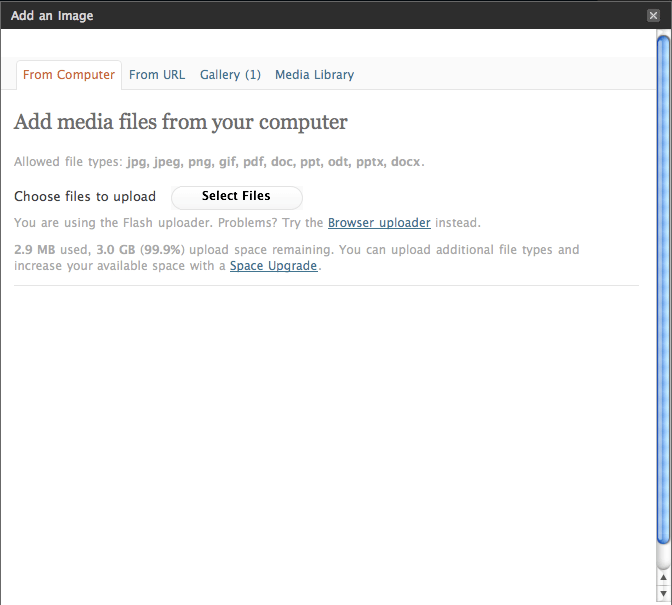
1)  Select the ‘Add an image’ icon

This is the far left square box. If you hover over it, it helpfully says ‘Add an image’. Thankyou.

picture-8


2)  Choose the file you want to add by using the ‘Select Files’ button. Simple.

picture-101


3)  Now the file name will appear. You assume that because it is now shown on the page that it has been uploaded, but actually there is another 2 or 3 second delay before it is uploaded and the rest of the form appears. During this delay I often find myself automatically pressing the ‘Select Files’ button again to (obviously) select the file I thought I’d just uploaded.  Fail! This takes you back to the upload dialogue.

picture-111


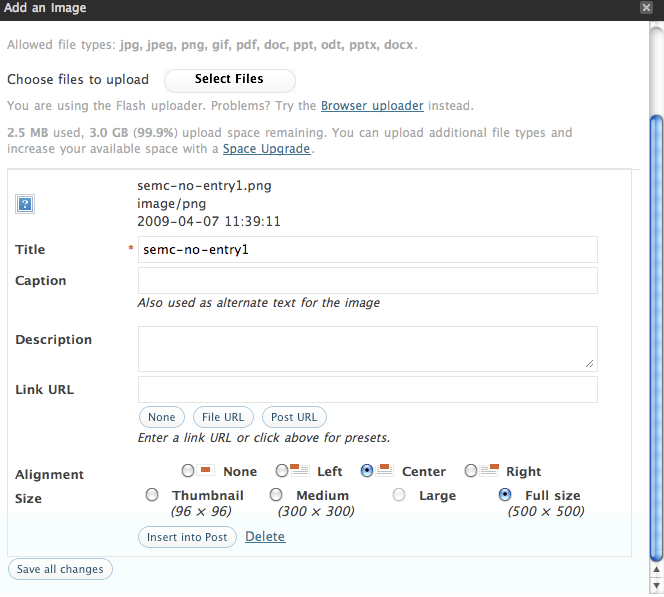
4)  The form appears. I have learnt that it isn’t necessary to complete all the many fields it presents you with so often I do just skip these. Then I automatically click the big button at the bottom which I assume is the final ‘yep that’s it I’m done, Save it’ but NOOOO this takes you to some library and doesn’t insert the picture! The big button at the bottom just conned you into doing the wrong action! Damn you WordPress! On other sites the bigger button at the end is always the final ‘I’m done’ button. Consistency please!

picture-1

As you can see, the actual button you need to press is slightly higher up and is labelled ‘Insert into Post’. It’s position with the border of the upload box suggests it is an option and not a ‘DO’ button. Just in case you do find it, there is a nice ‘Delete’ link placed right next to it just to try and catch you out at that final moment. Even though I learnt this weeks ago, it is still catching me out. After just choosing to ‘Add an image’ into my post why would the main action be to Save it to my library? The big ‘PRESS ME’ button on this page should be to insert the picture. 

Lesson learnt:

Think about what the user has pressed to initially carry out the task and ensure that you design for this task from start to end.

WordPress have tried to incorporate multiple actions (upload and insert) into the same dialogue and it doesn’t work. They assume that most users want to upload and not insert a picture. Thus they have chosen to give emphasis via placement to the ‘Save’ button. The end result is the user is caught out and frustrated. They may not even know why they went wrong which reflects badly on your site.

New iPod Shuffle Usability

ipod-instructions

This weekend I managed to check out the new iPod shuffle in all its glory. I couldn’t believe how small it was! It seemed smaller than I expected. Almost too small. Very plain and simple, in just two colours; black and silver (disappointing for me as I prefer colourful iPods). What roused my interest was that the hardware contains just ONE button!!! It has three switch positions to either turn off, loop or shuffle tracks. All your other functions are accessed via a ‘+’, ‘-‘ and centre press on the headphone controls. Yep just THREE buttons! 

Of course it is lovely for the user to be given such a small array of buttons. It simplifies the experience, gives them less choice so less confusion (normally). I wish remote controls would take this approach more often!

The one thing that I found quite odd was the high positioning of the controls on the headphones wire. They are very high up. So high that you can’t look at them unless you take the headphones out of your ears. So you are really relying on your sense of touch to find and press the 3 controls. I didn’t think this was too difficult but it wasn’t as easy as I would expect, considering this is the only way to control the device. I felt these buttons could have benefited from some added tactile definition. Positioning the controls lower down the wire would have been ideal and meant less movement required by the user’s arm to change tracks, which would be most welcomed when exercising.

I did consider whether they would have been better placing skip tracks on the volume keys. So that, for example, short press changes volume and long press changes tracks. But I remember conducting a study in the past where users were very split on what short press and long press would do. It was very easy for them to confuse the functionality of volume and skipping tracks when placed on the same key. So I fully believe Apple have made the right choice to place these differing functions on separate keys.

So this is one iPod where I’m afraid you will need to read the instructions as the functionality is very hidden. I suspect quite a few people will at first try changing tracks by using the + and – buttons. Navigating track lists sounds tricky. In fact, I’ve just read it twice and have forgotten how to do it already. But to be honest, I think although skipping tracks by double and triple clicking is completely new and requires some cognitive effort and learning, it is actually surprisingly easy to remember. It also helps that fast forwarding and rewinding require the same number of clicks as skipping tracks – you just have to remember to hold down on the last click. In essence they are the same actions. 

Apple are renowned for their ease of use so this new Shuffle will receive a lot of attention and no doubt some negative press surrounding the fact that learning is required to use this product. But we must remember that more buttons do require more hardware space, and if buttons are important to you, go and buy the other Shuffle version. If a small size and sleek look is important then Apple are offering this compact version with the trade-off that it will require actually reading the instruction manual on this occasion. But as the manual is a page long, hey it’s no big deal really. Personally when I’m at the gym I like buttons so I’m sticking with my current Shuffle 🙂 But thanks Apple for giving us the choice!

The wonder of the Underground

For those of us not based in London, the Underground is a very strange and alien world that we have never experienced before. Having visited London many times, I am now used to the wonder and excitement of the Underground but for this article I will be casting my mind back to my first experiences and how bewildered I was by how staggeringly difficult the whole experience was. So let me take you on a journey…

Firstly, there are the masses of crowds, pushing you along, forcing you to go at a pace that as a newbie you really shouldn’t be going at. You want to stop before you get lost but you can’t so you slow down slightly, get pushed to the side and finally find a little space to get your map out. Back on your way you go. Now you get to a junction where you have to decide which line you need to take. So, you walk over to the large tube map on the wall looking for something large that shouts ‘YOU ARE HERE’ but there is nothing. You have no idea where the name of the place you are is in London so you don’t even know which vague area of the map you should begin to look for your starting point. You start looking in the centre, but you just cannot find where you are, nevermind where you want to go. So you look around for some help… in the north we are used to men in uniforms hovering about to guide you in the right direction…hmmm no such look here and all the passers by seem so pre-occupied and are rushing past you so quickly that you cannot ask them either. 

tube map

Back to the map. Suddenly a lady comes over, also looking at the map so you grab the opportunity to beg her to tell you where on the map you are, but unfortunately she is also trying to find her way and begins to complain about the map. All you want at this stage is a list of stations so you can choose where you want to get to and it will helpfully tell you which line and importantly which direction (oh yes we’ve all made that mistake!) you need to go in. 

You finally work out which line it is, yes the yellow one (it helps us visitors if you use this terminology rather than saying the name of the line). So you take the escalator, however, everyone strangely seems to know this alien rule to you which is you should stand to the right and if you don’t people will tut and push by you as if you’ve done the most horrid thing in the world. But hang on we’re in the UK, we overtake on the right not the left so where did this odd rule originate? 

escalator

You make it to the platform and you have never seen so many people in such a small space in all your life!!! You consider turning back but it is impossible, the exit is totally blocked with commuters and the person on the tannoy system is telling you to move further down the platform. There is NO going back. There is an odd musty smell which makes you feel uneasy but how cute! there are rats running around on the tracks! Eventually you make it onto a train after lots of pushing and watching someone get trapped by the doors – what is all that about? What is this weird world where doors open and close on their own within a matter of seconds? 

busy

Suddenly, I remember that I was told by some fellow UX Londoners not to touch or look at anyone. But I can’t help watching these people because they are so fascinating. It becomes apparent that they really do not look at each other! I also notice people who get on, read a book for literally 1 minute before getting off – what is the point? How much can you really take in in a minute? But everyone is doing it…

I finally make it to my destination and pop into a cafe to reflect on my experience. I realise I’ve not seen any wheelchairs or pushchairs on my travels. Is the tube accessible for these people? I didn’t notice any lifts at all. 

Now that I have been to London many times I have fallen into the trap of behaving in this strange manner myself. It is so easy to slide back into it. But it really is alien to the rest of the UK. The next time you see someone staring at the map or someone stood to the left not the right, just remember that it is your world, not theirs that is odd and you must forgive them until they learn the ways 😉

Please share your thoughts with me. I’d love to hear them!