lady with iPad

NEVER Say This Word to Users (Avoid Bias and Improve Your Research Data)

Picture this: you’re invited to a research study. The researcher greets you with a smile and says, “This is an interactive activity that will take about 20 minutes.” Sounds intriguing, right? Now, imagine instead they say, “You’re about to take a test.” Suddenly, your mind races. “What if I fail? What are they looking for? Am I about to be judged? Will I look stupid?” That tiny word—”test“—can flip a switch in your brain, and not in a good way. If your role involves gathering data from customers, this is crucial to think about.

How people wrongly use the word ‘test’

I see people using the word ‘test’ all the time, even those working as professional researchers. 

Pre-research: 

  • Recruitment: Customer emails to ‘Take part in our user test’. Be careful of your participant recruitment company too because those are often just admin staff who then promote your research to their database as ‘user testing’. 
  • Calendar invites sent to participants with the title ‘User test’ (note: this reads as though the user is being tested. If you really must use the word ‘test’, please please for the love of God at least refer to it as a website test, not a user test!)
  • Initial welcome: ’Are you here for the user test?’ (said by the receptionist or researcher).

During the research

  • Confidentiality form / NDA will often let slip a mention of user test. Sometimes these are written by legal so you’ll need to tell them to change the wording.
  • Introduction section of the research: The facilitator will say ‘thanks for agreeing to take part in our user testing’ or similar. 
  • Aiming to reassure: ‘This is not a test’ (just saying the word will prompt people to think of it as a test).
Image: This is not a test

Why Labels Matter (Hint: They Totally Do)

To find out why labels matter and how they affect us, lets quickly head back to 2004, when Ross and colleagues ran a fascinating study. They asked people to play a game that involved cooperation (or not). Half the participants were told it was called the “Wall Street Game,” and the rest were told it was the “Community Game.” The rules were exactly the same, but guess what? The “Wall Street” group acted way more competitively, while the “Community” group leaned into collaboration. Just changing the name to ‘Community’ made them behave in a more collaborative way.

Labels act like cues—subtle signals that shape how people think they’re supposed to behave. If you call something a “test,” you’re setting a tone of evaluation. And when people think they’re being judged, it’s game over for authentic responses. 

What Happens When You Say “Test”

You might think “test” is an innocent word. It’s not. Here’s what it does to your participants:

  1. Cranks Up Anxiety: “Test” screams, “You’re being judged!” and that makes people worry. Anxiety takes over, and instead of focusing on the task, they’re focused on not messing up.
  2. Triggers People-Pleasing Mode: Participants may try to give you the “right” answers instead of their honest thoughts. Spoiler: this isn’t great for your data.
  3. Activates a Fixed Mindset: Carol Dweck’s research shows that when people feel evaluated, they can get stuck in a “fixed mindset,” where they play it safe instead of trying something new.
  4. Sets Up Defensive Behaviours: A test feels like a challenge, and people might approach it like they’re protecting themselves rather than exploring freely.

Ditch “Test” for Friendlier Options

If you want participants to relax and engage, ditch the T-word. Here’s what you can say instead:

  • Swap out “test” for words like “research,” ”activity,” “feedback,” “game,” or “exercise.” Doesn’t that sound more fun already?
  • Frame it as exploratory: “We’re curious to see how people solve situations like this.”
  • Keep it collaborative: “We’re exploring this together. There are no wrong answers.”

These tiny tweaks can work wonders. They tell participants: “You’re here to help us learn, not to be judged.”

How to Set the Right Tone in Your Study

Here are some tips to make sure you’re creating a participant-friendly experience:

  1. Test Your Labels (Pun Intended): Try out different phrases during your prep phase. Which one makes people feel most at ease? 
  2. Train Your Team: Make sure everyone on your research crew knows the drill—use non-judgemental, inviting language.
  3. Start Off Right: From your first email to the consent form, use words that spark interest and collaboration, not fear of failure.
  4. Avoid Fancy Jargon: Even “assessment” or “evaluation” can sound intimidating. Keep it simple and warm.

Why It’s Worth the Effort

Here’s the deal: your goal as a researcher is to understand how people think and behave in the real world. But if your participants feel like they’re under a microscope, their behaviour changes. By being mindful of the language you use, you can create an environment where people feel comfortable being themselves. And that means better, richer data for you.

So, the next time you’re setting up a study, think twice before using the word “test.” A little tweak in your phrasing can make a big difference to how your participants feel and the data you collect.

References

  • Ross, L., Greene, D., & House, P. (2004). The “Wall Street Game” versus “Community Game”: Situational labels shape decision-making in social dilemmas. Journal of Personality and Social Psychology, 87(1), 1–13.
  • Dweck, C. S. (2006). Mindset: The New Psychology of Success. Random House.
  • Kahneman, D. (2011). Thinking, Fast and Slow. Farrar, Straus and Giroux.
  • Schwarz, N. (1999). Self-reports: How the questions shape the answers. American Psychologist, 54(2), 93–105.

Day 1 UXmas Psychology: Mental Loads

Imagine you’re using the Government website for the first time to file your tax return. You have to remember important information, take care to not make any errors, make sure you pay the correct amount and submit everything correctly. As you do this, there are things you’re thinking about (cognitive), things you’re looking at on the website (visual) and things you’re physically doing like typing on the keyboard and using the mouse (motor). 

These are what we call loads.

Loads

There are three loads in total (cognitive, visual and motor) and you might assume they’re equally weighted, but they’re not. Each one uses a different amount of mental resources, in this order:

1 Cognitive

People use the most mental resources if they’re asked to remember something or perform a mental calculation.

2 Visual

Looking at something on a screen uses more mental resources than motor but isn’t as demanding as needing to think about the task.

3 Motor

Motor is the least demanding load as most movements are performed instinctively, without us needing to think about what we’re doing.

Do everything in 3 clicks?

If you work in UX or as a designer, someone at some stage has no doubt advised you that everything should be possible to do in 3 clicks. I’ve no idea which genius came up with this theory but I do know that it’s a load of rubbish. When designing a digital user experience, there are always trade-offs. If you have to add extra clicks but the trade-off is that the user doesn’t have to think as much and the user journey feels more logical, then those extra clicks are worth it. Adding clicks is less of a load than thinking. I’ve personally seen this time and time again in the UX research and user testing that i’ve conducted over the years. As long as the experience is well thought out, logical and the pages are well structured, the number of clicks doesn’t matter. 

When motor loads are too much

Despite motor loads being the least effortful of loads, there are things that designers do that increase their effort. Many years ago I worked for one of the leading mobile brands and there were many times when I had to go back to the designers after user testing to tell them their hit areas and visual buttons were too small for people to press easily. The UI buttons would require multiple presses or a very accurate tip of the finger press to work, and people with long finger nails had absolutely no chance. What looks good on a large monitor often didn’t work well when it was shrunk down onto a small screen.

Sometimes you want to increase loads

Most of the time you’ll be looking to decrease loads to make your product easier to use, but there are times you may want to increase the load. For example you might add a video to a web page to deliberately draw the user’s attention to the product (visual load increased). The best example of purposefully increasing loads is in the gaming sector. In a game, there are quests that the user should find challenging to accomplish. Some games have high cognitive loads as the user has to work out what they need to do to make it to the next level. Some games have high visual loads, where users need to find things on the screen. Some have high motor loads, where users have to use a physical device to move around the game and interact with the characters onscreen. 

Key takeaways

  • Evaluate your existing website/app/product. Can you identify any opportunities to reduce any of the loads to make the experience easier?
  • Don’t make people think too much. When designing your product, try to reduce the cognitive load as much as you can. Don’t make people remember information that’s going to be too difficult for them to recall. Think how you can get around this, such as leaving the field optional or allowing them to complete this information later.
  • Where you can, look to reduce cognitive loads by increasing visual and motor loads. For example, rather than the user needing to read a full web page of information, a large clearly written call to action that draws them to the right place would be more effective.
  • Make sure that physical targets are large enough to be easily reached and easily pressed.

Interested in UX Psychology? Sign up to 24 FREE lessons in UX Psychology in my countdown to Christmas!

Lisa Duddington MSc, UX Consultant

Need UX research? PrestigeUX.com

Need users? INeedUsers.com

Warning: ANOTHER addictive game for designers

Following yesterday’s post on the most addictive game for designers, I’ve been informed that there is another hugely addictive game! Thanks to Peter Brooks for the recommendation.

In this game, you view a wireframe and type in the name of the website you believe it’s representing.

I apologise for your lost productivity these last two days.

Click the image below to begin…

http://dedesigntheweb.com/2.html

Warning: Most addictive game for designers

Get ready for the most addictive game you have ever played! Especially if you’re a designer or a UXer.

You’re going to have hours of fun with this one. Get ready for a decrease in productivity and an increase in competitiveness once everyone in your office gets their hands on this!

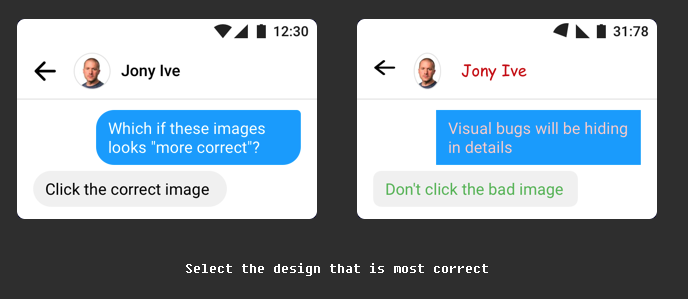
All you have to do is look at both images and click the one that you think is the correct visual design.

Click the image to begin…

https://cantunsee.space

Introducing MediaCityUX.com

Hi everyone! How are you doing?

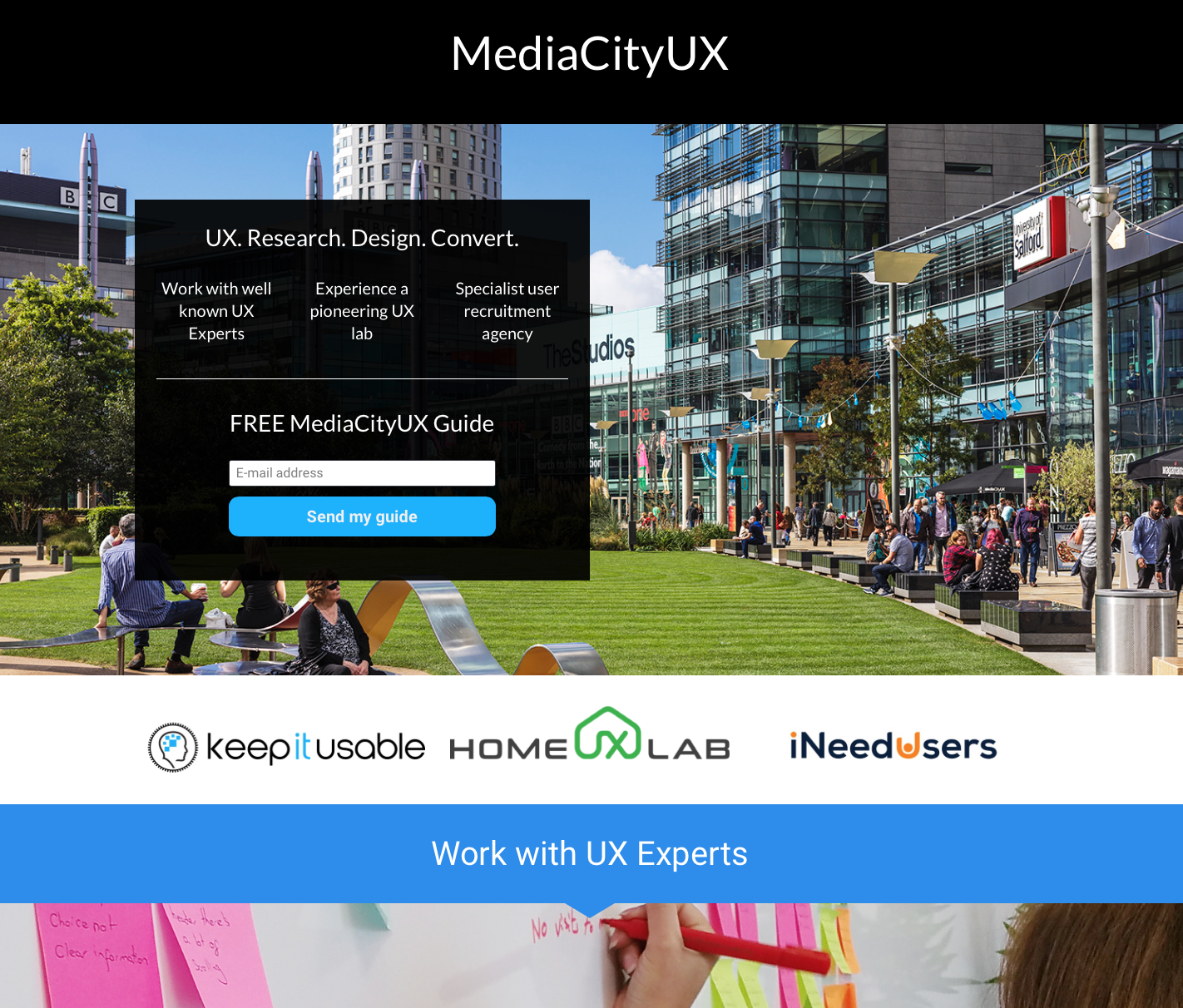
This is just a quick post to tell you about the launch of our new site MediaCityUX.com

As I’m sure you already know, I run three UX businesses:

Keep It Usable: Human-driven research and design. Award-winning user experiences, service design and innovation based on Psychology, Science and Behavioural insights. You’ll often see us speaking at events and educating about how Psychology can be used to change behaviour in digital experiences and persuade people to buy online!

Our work has been showcased at 10 Downing Street, won awards and featured on BBC’s Horizon. We’ve also appeared on BBC Breakfast, radio and at events, sharing our expertise.

Home UX Lab: Pioneering homely style research lab, combining the benefits (validity) of ethnographic research with the rigour of a lab. Home lab has been the inspiration for multiple home style labs since we invented it.

I Need Users: The only participant recruitment agency run by UX experts. Shorter lead times, last minute recruitment options, extra screening processes, better quality users and less dropouts. Worldwide user recruitment.

They’re all based at Media City here in the UK, although we work worldwide for global clients. So, we created MediaCityUX.com for you to easily find UX services when you need them. Whether that’s a full design project or research piece by Keep It Usable, needing to rent a lab in the UK (Manchester) or needing participants for your own research.

Bookmark it.

Screen Shot 2018-04-26 at 09.22.44.png


Expedia Experiences: Bad CX never wins

This is a true story about Expedia, human error and bad customer experience that ends with a nice bit of karma for the customer… 😉

Next week I’m running a workshop at UX Live in London and being from Manchester I needed to book somewhere in London to stay for the event. So earlier this week I went online to book my hotel. I don’t have a preferred hotel or website that I book with, so my starting place, like many people, is Google. I’m really into using Google map view to find hotels as I can see how close the hotel is to the tube and I can check long it will take me to get there from Euston and my place of work during that time, plus I can see all the prices of the hotels to find something within the budget I’m given.

Screen Shot 2017-10-20 at 10.09.51.png

(Image represents the Google UI. This is not the hotel I booked with)

Expedia user error

I’ve been extremely busy this week and I had about 10 different hotel tabs open to compare all the different hotels. Add to this distractions in the office and at some point during this process I accidentally chose dates in November as opposed to October.

What happened?

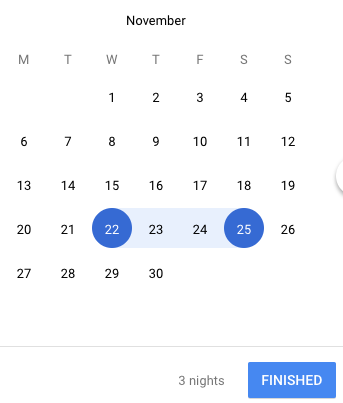
I used the calendar date picker to select the last Wednesday to Saturday of the month, as opposed to focussing on the dates. I did this in either Google or Expedia, I can’t recall which one it was (probably Google) but it looked something like this:

Screen Shot 2017-10-20 at 10.08.37

The realisation

It was the next day, less than 24 hours later, that I was looking at my calendar to book in a meeting when I noticed the hotel was there in my calendar for November! I instantly knew the mistake I’d made.

Expedia call centre experience

The ticket I’d booked was non-refundable because I knew I was definitely going to the event next week. However my mistake was a bit of an odd situation in that I didn’t need my reservation refunding and I wasn’t changing the date because I’d changed my mind – it was simply human error when using the website and it was a genuine mistake. My hope was that if I explained this and they could see it was less than 24 hours since I’d booked it that they’d understand this was a genuine mistake and change the booking.

I called the hotel first but they told me I needed to call Expedia to change the booking. So, I then called Expedia and got through to their call centre. The lady I spoke with said she would call the hotel to check if the dates could be changed, she also told me that if we were cut off she would call me back (I thought this was a very odd thing to say and immediately suspected that she was planning to cut me off despite me being incredibly polite in my request). Low and behold she put me on hold, then about 10 seconds later I heard background noise as if she had picked up the call then I was cut off!

20 minutes later and she didn’t call me back as promised so I called again…

This time I spoke with a different person and I explained what had happened, including my previous call. This gentleman said the same thing to me – that he would call the hotel and that if we were cut off he’d call me back. He put me on hold, after a few moments I then heard the background  noise of the call centre followed by being cut off. He also didn’t call me back as promised.

I called again…

I explained to another lady what had happened and she told me she would call the hotel to check if they would accept the change in dates. Interestingly she didn’t say the line about ‘if we’re cut off I’ll call you back’ so I suspected she was actually planning to help me, unlike her colleagues. Unfortunately, she said the hotel were unwilling to change the dates as it’s a non-refundable booking and I’d basically have to wave goodbye to £300. I asked her for the number she called so I could call the hotel myself.

I called them and they said there was nothing they could do as it was the front of house number not the central reservations number, so the lady had called the wrong number anyway! There’s no wonder they couldn’t do anything. I wasn’t impressed. Yet another Expedia fail – these peeple were useless.

I called the hotel central reservations and would you believe it, they were willing to change the booking dates as long as I paid an extra £30 when I arrived at the hotel. Hooray! Yep sure, no problem! They said they’d call Expedia to get them to change the booking.

Later that day I had a call from Expedia – it turned out to be the last lady I spoke with. She said because of the change of dates I was to be refunded £30 as those dates were cheaper. She also said she was really pleased that she had been able to get a solution for me. Excuse me? Was this woman deluded? She hadn’t found the solution, I had!

This story gets better though…

Later, I received another call from Expedia. This gentleman had a very strong accent and he had to explain himself about 6 times to me because I simply didn’t understand what he was trying to tell me. I finally piece together that he wants to charge me £30 because there was a ‘human error’ earlier by the Expedia lady. Apparently she shouldn’t have refunded me the £30 because the booking was non-refundable.

The irony!

When I made a human error they wouldn’t forgive it and would have happily taken £300 from me. They make an error and they want me to let it go and pay them back the £30.

They put me on hold so I found myself with time to think about this… There were so many great things going through my mind that I could say at this point… should I tell them I have a non-refundable policy like theirs… should I complain about how inept their service team is…

I found myself thinking back to how they treated me in my previous calls; they hung up on me. So I decided it was time for karma to prevail… let’s treat them in the same way they treat their customers and perhaps they’ll learn a valuable lesson…

I smiled to myself and hung up. 

They didn’t call back.


The lesson: Customer Experience is crucial to get right and it’s not enough to simply look at your digital User Experiences in isolation of all customer touchpoints with your business. There’s absolutely no chance I’ll ever book with Expedia again!

Samsung Galaxy S8 Unboxing and Setup

I’ve been waiting AGES to get a new mobile. I had my heart set on the Samsung Note until it started exploding… I checked out the Pixel but wasn’t impressed by the hardware – it felt cheap and I didn’t like the back of it. I even considered the iPhone, after all I’m a loyal Apple customer, all my other devices are Apple so why not my phone too? But although I love the hardware of the iPhone, I’m just not overly impressed by what’s inside. It feels like they’re not pioneering in the mobile sphere as much as they used to. They’ve got a bit comfortable…

So, when I heard of the Samsung Galaxy S8, I tried not to get my hopes up too much. However, when I saw it in the Samsung Experience store I was suitably impressed.


Hardware

The hardware is NICEEEE! I’ll admit, I’m a hardware snob. What can I say, I used to work in mobile hardware so I’m now a bit fussy about good looking, high quality feeling devices. And boy, does the S8 feel high quality! Rounded edges, a good weight and classic shiny black finish that blends seamlessly into the infinity screen. Weight is important as a heavy phone is more likely to be dropped, whereas a light phone will psychologically feel cheap. It’s a fine balance.

The hardware keys are easy to locate by finger touch. However, the finger print scanner and the health sensors are very close to the camera lens. The topography of each is difficult to feel by touch alone so there’s a risk of getting finger prints over the lens if you’re not careful (although a case solves this).

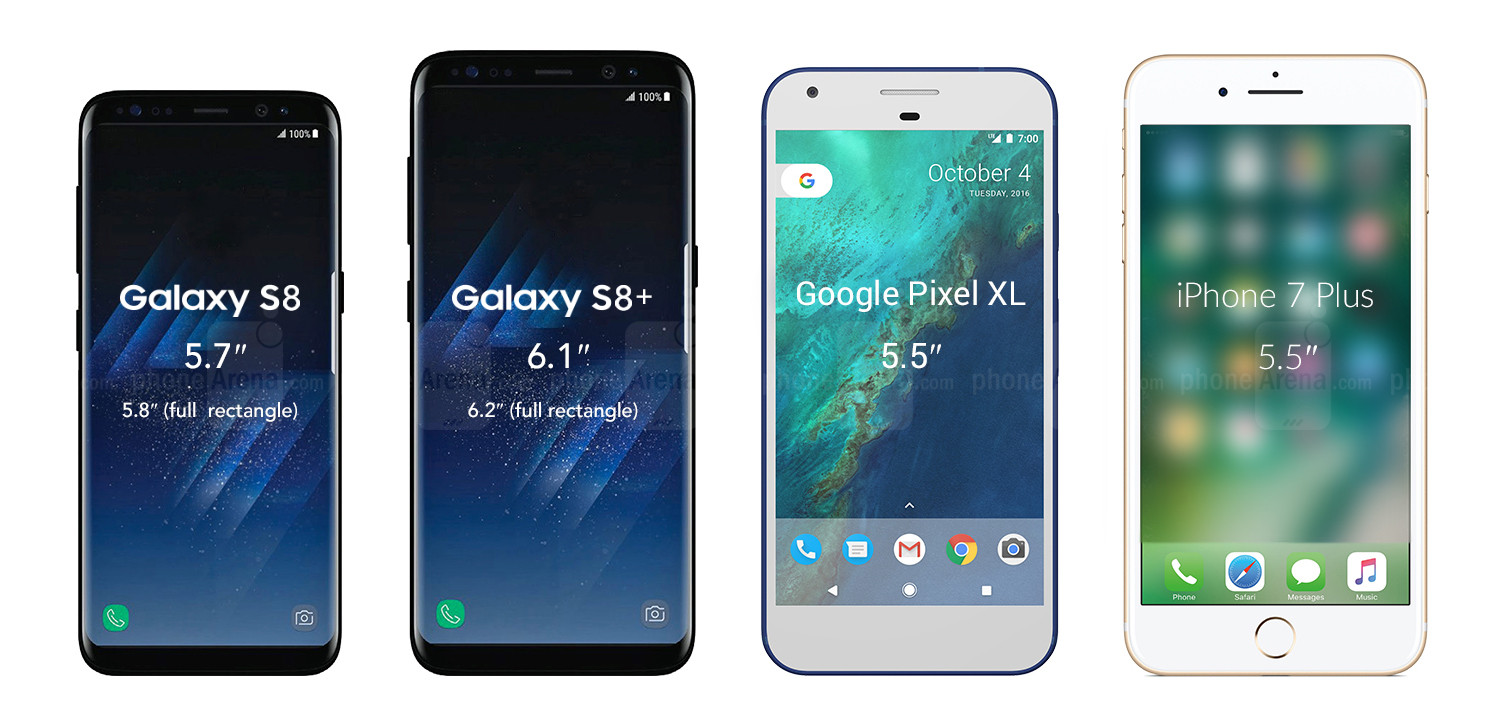
I went for the S8 because I’ve been using a Note and I find it too big to use one-handed. It’s nice to mix things up a bit so I thought I’d drop down in size for this phone and maybe go up again after that. Using a bigger screen is a really nice experience, however because the screen in the S8 is tall and narrow as well as being edge-to-edge, the phone manages to be physically smaller but with a larger screen larger than bigger mobiles.


Galaxy-S8-and-S8-vs-Pixel-XL-vs-iPhone-7-Plus


Software, setup and user interface

The setup process was relatively easy. It took longer than I expected (and longer than it takes on iPhones), which was surprising because I’d already backed up my old phone ready for the transfer. There are a lot of steps and a lot of small print to accept.

There’s also a lot to remember.

Much of the setup process involves teaching you how to use the phone, including it’s many hidden gestures. This is both a positive and a negative. On the positive, it simplifies and cleans up the user interface as there are less onscreen buttons and commands required. On the negative, I’ve probably forgotten most of them already as there was a lot to take in (did you know our short term memories can only hold around 5-9 items for 15-30 seconds unless they’re repeated?).

The setup process teased me with the face recognition, iris scanner and fingerprint scanner as security measures, but it skipped the actual setup process of these which was odd. I had to go back into them afterwards and they are impressive! I’ve now setup all three but am currently using the face recognition. You do have to press the hardware key first to wake up the phone but then the process of scanning your face is almost instant. In the past, Samsung have been let down by gimmicky features that didn’t actually work very well in reality, but this is reliable, quick and cool. I love it!

The edge panel is a little disappointing. It’s one swipe access to your favourite apps, contacts or editing tools, however I don’t see the benefits, when you could just put your favourite apps on your Home screen, or you could just swipe up to see all your apps. It also covers the whole screen as opposed to just popping out from the edge. It feels like a step backwards from their previous designs of the edge. On the Note, the edge was something I used all the time to access my favourite apps because it’s always onscreen. On the S8 it doesn’t have that benefit. Instead, I’ve placed my fave apps on my Home screen as it feels easier to access than dragging in the apps from the edge (which often switches panels instead of bringing out the edge, so you need to be accurate).

Bixby is amazing! I love that I can take a photo or add an image and it will find me that item online. It will even translate languages. I’m looking forward to trying this when I visit Lisbon later this month – it should make translating menus really easy!

The camera is incredible in daylight and I’m really impressed with the background blur effect that you can get (who needs an SLR when you have an S8?!). However I tried both photos and video last night and they were both a little pixelated. In fact, I’d say my Note Edge was better for night time shots. I did just have it on the default mode so this may be improved if there is a night mode – I haven’t played around too much with the settings yet.

There’s a nice hardware shortcut that I discovered to get to the camera. Let’s face it, no one really carries a camera with them anymore because your phone is your camera these days, so why is the camera app always so cumbersome to access? Samsung have solved this by a simple double press of the Power key. It means there’s no need to look at the UI (which is a struggle on a sunny day), you can keep your eyes on the subject you want to photograph whilst you’re taking your mobile out and turning on the camera. THIS IS GREAT USER EXPERIENCE!

There’s so much more I could say but I’ll save that for another post once I’ve settled in with the S8 and used it a bit more.

So far, I’m really impressed. Sleek, high quality hardware and impressive features. It feels futuristic and I can’t wait to see what else it can do!

Is there anything you want to know or see of the S8?

Let me know and I’ll check it out for you.

Tips for conducting international user research

This week I’ve once again been conducting and overseeing an international user research project, so I thought I’d share with you my top tips for finding trusted research partners, managing and conducting international research projects.


Finding a trusted partner

When it comes to conducting user research in another country, your biggest challenge will be finding an agency you can trust to:

  • Be there for you when you need them.
  • Communicate well enough in your language that nothing is lost in translation.
  • Have good project management in place.
  • Find good quality participants/users.
  • Provide a good quality technical setup.
  • Conduct user testing well (many aren’t used to this).
  • Not rip you off.


Beware of time zone differences

With any agency you use, it’s important they are there for you when you need them. If you send them a message about a project, you will need to take into consideration the differences in time zones as it can cause delay to your projects.

I’ve recently been working with an agency in New York and on another project with Mexico, so have had to be flexible with my hours, working into the late evenings for calls and emails.  I also have to bear in mind that when I want something the next morning, I’ll have to wait until 2pm at the earliest to receive a reply.


Good communication is crucial

You’ll need to check both their written and verbal ability to speak your language. It’s no point them conducting great research, if they can’t communicate the results well in the report or presentation. For example, I find that people in some Asian countries write English very well but it’s more difficult to understand their spoken English especially as we’re often communicating over the phone/internet so the line isn’t always very clear.


Project management needs to be awesome

Leading on from communication, their project management needs to be really tight. How are they getting on with their recruitment? When are they seeing their first user? How did the first interview go? Do they have any concerns? You shouldn’t need to chase them too much, a good partner will be pro-active in letting you know where they’re up to and any potential issues in the project.


Finding good quality participants

It can be difficult enough finding a good user recruitment agency in your own country, nevermind one in a different country where you don’t speak the same native language or know the culture. You’ll need to feel certain the agency can recruit your user types and do it in the time they state. Trust your gut feeling and beware of costs that appear too low as they may be using methods that are easier for them but attract lower quality participants.


Technical setup

Always ask for a sample of a previous research video, to check the moderator or agency’s previous recording quality. Check the video and audio quality, especially where devices and screens are involved. You’ll also need to check that they have the equipment and software to test mobile devices.


Can the agency conduct user testing?

This is something you’ll need to check. If they say they do user testing, you’ll also need to check to confirm they’re telling the truth – many market research agencies have added this on to their list of services without any experience. It doesn’t necessarily stop me from using them  – it depends on the project and I may decide to spend a little time training them over Skype if, for example, the website testing is a smaller part of the research hour.


Are they ripping you off?

I’ve certainly experienced receiving a quote from a research agency or a recruitment agency in another country that I knew was far too high. Watch out for agencies who see you’re from (the UK in my case) and hike their prices up. If I feel they’re way too high and they’re taking the mick, I’ll simply go to another agency. If I feel they’re slightly too high I’ll address it directly with them to see if they’ll come down. Remember, for some countries, negotiating and haggling prices is expected.


Add additional translation time

Translation is one of those activities that takes far longer than you expect. If you’re getting a translator in your own country to translate research conducted in another language, make sure you give yourself plenty of time, then add some more as a buffer!


Need help?

Need help with international research? keepitusable.com

Need help with recruiting users in other countries? iNeedUsers.com


ineedusers-ux-user-research-participant-recruitment-specialists

My nightmare user recruitment experience…

As someone who has worked both client and agency side, I can tell you that I’ve found it very difficult finding good participant / user recruitment agencies. The country where I’ve had the most issues has been the UK and I believe this may be because of the recent explosion and in cases exploitation of ‘UX’. Companies who traditionally recruit participants for market research, have added UX, usability testing, user research recruitment to their list of services without making any changes to how they approach the recruitment.


My nightmare experience…

One experience that I remember very well (because the recruitment was an absolute nightmare!) was a project that my agency Keep It Usable was conducting for a global retailer. This was several years ago, when we used specialist recruitment agencies to find our participants for us. We had done everything for them to prep, including writing the screener, so all they had to do was promote it and screen people to find our users. It was a very niche user group (roughly about 3% of the population) so we made sure to give them plenty of time to recruit (about 5 weeks) and they were certain there would be no issues.

You can probably guess what happened next… with one week to go they told me they had found it impossible to recruit even one person for me! One week! With such a niche user group and only a week to go, no other agency would take the recruitment so we had no other option but to bite the bullet and pull out all the stops to try and recruit users ourselves. We did it! It wasn’t easy but we managed to do in one week what an experienced recruitment agency couldn’t do at all.

I guess this was the starting point for me in not trusting participant recruitment agencies. I’m very conscientious about the work we do (in fact in my school reports the word conscientious cropped up all the time), and the reputation of our work was potentially at risk if this happened again.


4 weeks notice…. really???

Another problem I had with agencies was that they needed at least 4 weeks notice which is just ridiculous in the world of UX. 4 weeks notice is a real luxury that us UXers just don’t have.

We’re iterative! We’re lean! We do things fast!


The solution…

Not being afraid to innovate and pioneer, we decided that if no one did UX recruitment up to our standards and the needs of us as UXers, then we’d just go ahead and create an agency that did! We’ve been testing and refining our recruitment methods over the past 2 years and after many happy clients, we’re now opening up the best user recruitment experience to you too.


Welcome to I Need Users

I hope you like the name 🙂 I Need Users is a specialist user recruitment agency for UX research. Founded by and run by UX experts, who totally understand your needs and the research you do.

ineedusers-ux-user-research-participant-recruitment-specialists


Bonus….there’s a loyalty scheme too!

Why shouldn’t you be rewarded for your investment into improving user experiences? My original motivation for getting into UX was to make the world an easier, less frustrating place to live in through our everyday interactions. So, to encourage you to invest in your UX and improve your experiences (as well as of course your conversion), every time you buy user recruitment through I Need Users, you’ll receive loyalty points that can be swapped for fantastic rewards!

You can also earn points for any spend with our full service UX agency Keep It Usable and our pioneering UK based UX Lab HomeUXLab.com


I’d love to hear about your experiences – have you had any nightmare user recruitment experiences?


You might also be interested to read:

Top 10 major risks of poor user recruitment

Mobile UX and ‘thick users’

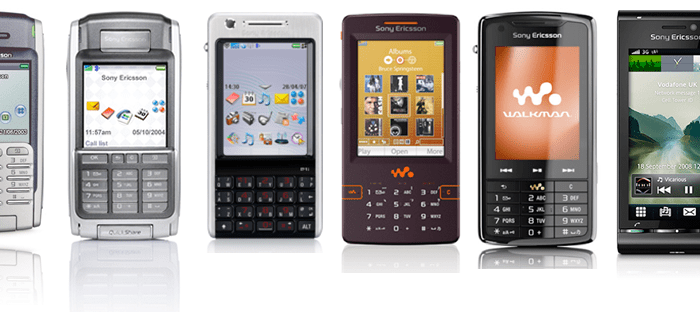
7 years ago today my time with Sony Ericsson came to an end.

I used to work for them as a software and hardware usability specialist. Our part of the company was dedicated to smartphones. Back then, they weren’t mainstream. They were incredibly expensive, a status symbol, mostly owned by business people. Perhaps you had one? (leave a comment if you did!)

At that time, there were no guidelines in the public domain for smartphone UI design. When it came to things like navigation, fundamentals, hit areas, button sizes, tactile feedback, hardware ergonomics, we had to design and test everything from scratch. And this was much more difficult than it is today.

Design and prototyping

Believe it or not those lovely prototyping tools you’re used to using didn’t exist back in the early smartphone days. Seriously, count yourselves lucky you have these! The UI design team used to use Adobe products for design. For prototyping, Macromedia Director and Flash were firm favourites.

For the early flip style smartphones, we had to design not just for one style of interaction (full touch) but there were actually three interaction paradigms!

1. Full touch. This is like what you have with your current smartphone – the full UI has touch interaction.

2. Full flip keypad. With the flip closed, the UI could be fully navigated and interacted with just using the hardware keys on the flip.

3. Combined: Touch and keypad. With the flip in the closed position, the touchscreen shrunk to the smaller size but it could still be pressed using touch. The UI could also be fully navigated and interacted with using the hardware keys on the flip. This meant for a complex interaction style. Everything that was designed had to be tested with three interaction paradigms – complex stuff!

Old skool mobile user research

User testing meant looking over the user’s shoulder to see what they were doing. This was coupled with note taking at the speed of lightning to miss as little as possible!

Conducting research with mobile users years ago was fun to say the least. We didn’t have the means to record mobile UIs, so it meant looking over the user’s shoulder to see what they were doing. This was coupled with note taking at the speed of lightning to miss as little as possible and get everything down before you forgot it, being mindful that as you were scribbling, you were missing further user interaction. As the researcher, you then had to also follow your discussion guide and focus on maintaining the flow of the interview. I developed the knack of note taking without looking at the paper in the end – it wasn’t pretty but it worked a treat!

HIPPOs and developers

Developers were particularly problematic and I remember seeing red once when one  said to me I must have asked ‘thick users’

At the end of the research there was no video evidence so then began the battle of convincing stakeholders. Developers were particularly problematic and I remember seeing red once when one said to me I must have asked ‘thick users’ because my research findings didn’t agree with their personal opinion. Seriously… I’ve heard it all! Patience is a definite requirement of any UX person and fortunately I have bags of it – queue a big friendly smile and a simple explanation of why users aren’t thick.

HIPPOs were also a huge problem. This is when the highest paid persons opinion overrules everyone else (in our case this was made worse by the fact the top decision makers were based in another country). It’s still incredibly common in companies and the only way to overcome it is to get the HIPPO on your side. Befriend them, educate them, show them evidence, let them think they’re making the decision.

Get the HIPPO on your side. Befriend them, educate them, show them evidence, let them think they’re making the decision

Running around corridors after users…

I remember a time when I wanted to replicate more natural usage of mobile, so I tasked users with walking down the corridor whilst carrying out tasks. Of course, this meant I had to scurry along behind them, trying to see what they were doing whilst making notes, remembering my guide, asking questions, etc, etc. It won’t come as a surprise to you to hear I didn’t do this again in a hurry! There’s only so much multi tasking one person is capable of.

Mobile research is so much easier now, thankfully!

Twinkeys and no keys… dealing with poor hardware usability

Our industrial designers were based over in Sweden, silo’d from the UI team. One day the hardware would just turn up and there’d be crucial functions missing that had been specified in the software. This then meant a long battle to make changes. I’m a qualified ergonomist so I adapted my role to include focus on hardware usability and worked on building relationships with the ID team. This worked really well and in the end they genuinely appreciated having someone to review their early design mockups and be the intermediary between them and the UI team.

Everyone benefits from capturing potential issues as early as possible

What happened to mobile innovation?

I was fortunate to make my way into several future concept groups and to help define some incredible future technology for mobile devices. There were some amazing things in the pipeline that I still haven’t seen on any devices. It feels as though mobile innovation has come to a bit of a standstill since the iPhone. I’m really looking forward to the day when the next big tech change in mobile happens.

7 years on…mobile is bigger than ever!

So, 7 years have passed… how did time go so fast!? Mobile is now bigger than ever and smartphones are mainstream. Most of my work in mobiles now involves helping companies to improve their mobile website conversion or their mobile app user experience.

Despite the fact that mobile is now huge, it remains the most difficult platform to design for

So many well known brands still make obvious mistakes in their mobile experiences.

There’s a real opportunity to stand out if your brand offers the best mobile experience

Need help with mobile?

Then you’re looking in the right place! At this point I should probably point out that at Keep It Usable, we also have the UX designer of the first ever smartphone.

Our mobile expertise is unrivalled

We know mobile design and user behaviour on mobile inside out, we know what works.

PS If you used to own a Sony Ericsson smartphone let me know! 🙂