The first usability book I ever bought

[tweetmeme source=”usabilitygal” only_single=false]

For a while now i’ve been wondering where my old favourite usability book was, then whilst I was clearing out an old box of books I found it! Christine Faulkner’s The Essence of Human-Computer Interaction. It was the first usability book I bought when I was at uni and it remained my favourite right up until I discovered Steve Krugg.

It’s a little dated now, however it’s still brilliant. It has all the basics you need to know, it reads easily and being a thin book it’s great as a quick reference tool. I always preferred to sit down and read it compared to the heavy going Jenny Preece and Alan Dix HCI books that were around when I was at uni!

Although it’s 13 years old, it’s still a good read, especially for the beginner and you can pick it up from just 78p on Amazon! Bargain!


Amazon fails on heuristic ‘user control and freedom’

[tweetmeme source=”usabilitygal” only_single=false]

Yesterday I decided to have a clear out and sell some of my stuff on Amazon. I prefer selling on Amazon to Ebay as it’s much quicker and easier – no need to mess around taking pictures of items and entering lots of details.

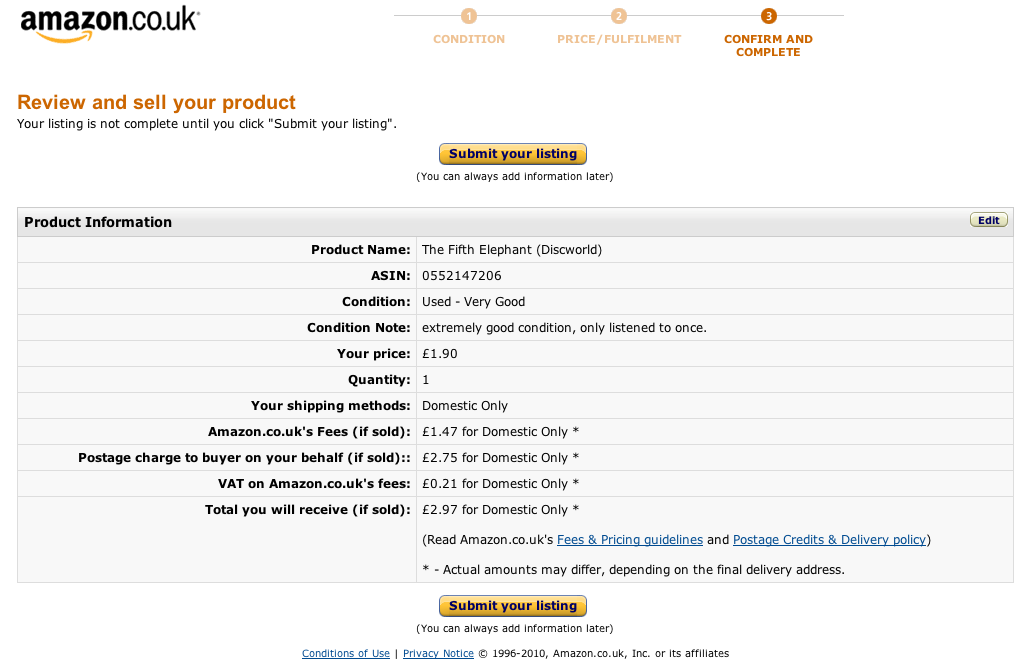
One of the items I was intending to sell wasn’t worth much, and my planned sell price was only £1.90. So when I came to the following screen and saw the fees Amazon would charge me for placing this listing would be £1.47 I decided it wasn’t worth the effort and to cancel the listing.

Here’s the screen:

amazon screenshot

How would you cancel this listing? (click on the picture to enlarge it)

What I expected to see here was some kind of button (or hyperlink) saying something along the lines of ‘cancel listing’, ‘don’t submit’, even ‘back’ would have been better than nothing. When I couldn’t see anything to do this I tried pressing the amazon.co.uk logo, thinking this would take me to the home page but it was inactive at this stage.

Nielsen’s Heuristic ‘User control and freedom’

One of the famous usability heuristics states that you should always let the user have control and freedom over their actions. There should always be a clearly marked exit route in case the user doesn’t want to progress further or if they have unintentionally entered a screen and they need to go back.

There is a useful usability evaluation checklist for websites from infodesign. Using this checklist, we can identify three points where amazon could improve this particularly screen:

  • There should be a clearly-identified link to the Home page
  • The user should be able to able to cancel all operations
  • There should be a clear exit point on every page

How many UX people does it take to lock a door?

[tweetmeme source=”usabilitygal” only_single=false]
We experienced the door lock from hell this weekend. The simple task of locking a bedroom door turned into major STRESS!

Background:
Attending wedding. Time VERY tight. Going to be late if don’t leave immediately.

The problem:
Hotel room door will not lock!

Current mental model:
Put key in lock……turn key……door locks

What actually happens:
Put key in lock….turn key….try putting key in upside down…still won’t lock…turn key again…..open, close door….keep turning key….slam door….shake door handle… after several attempts and visions of entering church after the bride, I rush downstairs to get help, leaving UX boyfriend with Satan’s lock.

Solution:
Receptionist casually informs me of a small panel attached to the INSIDE of the door explaining how to lock the door, which apparently can only be done from the inside. The fact that this notice is there shows that this must be a common problem. But it’s on the inside of the door! People lock doors from the outside as well as the inside.

Skill required:
It turns out that locking the door isn’t as simple as following the instructions on the panel. Skill is also required. The instructions say to twist to lock, however, after much trying we discover that you also need to hold the handle stable with the other hand to get the lock part to turn.

picture of lock

Danger!
Not only is this locking method not intuitive and difficult to do but it also increases the risk that the guest will leave their key in their room as they aren’t required to use the key to lock the door.

So, how many UX people does it take to lock a door? 2 with the help of a hotel receptionist already familiar with the method of locking.

Did we make it to the church on time? Unfortunately, we arrived after the bride (upon seeing the empty bridal car, panic and cursing of the hotel door ensued) but we managed to sneak into our seats before she walked down the aisle. Phew!!!

What to Expect in 2010: UX/UI Design Simplicity

I recommend you have a read of this article by WebDesignerWall if you’re interested in UX trends for 2010. I particularly agree with every site having a mobile version. I’ve thought for a while now that mobile is going to be the biggest access point for the internet in the very near future. The only thing stopping this was screen sizes and cost but we have seen a huge improvement in the last year on both of these in the form of touchscreen phones and flat rate unlimited data price plans. I love the ‘Clean and simple’ point too, but that goes without saying 😉

Here are the 2010 trends the article discusses:

– Clean and simple

– Single page websites

– Sliders

– Modal boxes

– Smart navigation and taskbars

– Text as the new image

– Larger page layouts

– Mobile version of every site

– eCommerce tweaker shopping

– Smart forms

Ergonomic christmas tree carrying

It’s the 1st of December and I’m sure many of you are now getting your warm coats and scarves on ready to go hunt down the perfect tree for christmas, chop it down and drag it home. Ok, it’s probably more likely you’re nipping to the local b&q to buy one pre-cut but let’s give a moments thought to how you should pick it up and carry it home. Of course, we’re going to be looking at the ergonomic method.

Ergonomics?

Ergonomics is the science of adjusting the task to the man. It is concerned with the motion and activity of people, their use of tools and machinery, and the design and arrangement of work for greatest safety and efficiency. Injuries can occur when there is a mismatch between the physical demands of a task and the capacity of the person doing the task.

Lesson 1: Bend the knees not the back!

You might have heard this one before. When lifting anything heavy (like a big christmas tree) you should bend down using your knees, keeping the back as straight as possible. Pick up the object and stand up using your legs to bear the weight (push up from your knees). Leg muscles are much stronger than back muscles. Trying to lift using only your back muscles can result in bad back syndrome and i’m sure you don’t want to have a bad back over the festive season.


Wrong! This man is bending his back and not his knees. Ouch!


Right 🙂 This man bends his knees, using his strong leg muscles to lift the tree.

Lesson 2: Stand close to the object being lifted

Minimises strain on the back and arm muscles. Aids grip and lift.

Lesson 3: Get a friend to help

If the tree is particularly heavy get a friend to lift the other end.

Lesson 4: Wear PPE (personal protective equipment)

Wear sensible clothes that cover your skin and protect it from the needles. Gloves are a must!

Lesson 5: Stretch!

Ok you may feel a bit stupid doing this one but it will benefit your muscles and decrease risk of injury if you stretch before and after lifting a heavy object.

More christmas tips to come! Have a happy ergonomic christmas!

Want a FREE usability review?

yay

Oh Yes!! To celebrate World Usability Day this coming Thursday, I would like to offer a free usability review to someone. It doesn’t necessarily have to be a website, it could be an iPhone app or anything else that I can easily access.

If you want to be considered, fill in the contact form or email usabilitygal@googlemail.com with details of what you would like reviewing. Closing time for entries is 8pm Wednesday 11th Nov.

Good luck!

Ergonomics Society 60th Anniversary Conference


es60logo

Last week I attended the Ergonomics Society’s 60th anniversary conference. I’m aware that a lot of people don’t understand what the term ergonomics means so here’s a definition I’ve found for you:

“Ergonomics and human factors use knowledge of human abilities and limitations to design systems, organizations, jobs, machines, tools, and consumer products for safe, efficient, and comfortable human use.”

So I hope you can see that having a good knowledge of ergonomics enables a person to design and evaluate something which is easy to use.

Anyway, back to the conference. This year was my third visit to the Ergonomics conference. My first two were in 2004 and 2006 when I was a student. Basically, in order to attend the event for free I volunteered to help run the event as a member of the secretariat. We set up the rooms, signage, general background stuff that helps the conference to run smoothly and we also time the sessions so the speakers don’t overrun. The days are really long but it is fun to do and the networking opportunities are brilliant. I saw an article in the Ergonomist magazine asking for help from past secretariat to run the 60th anniversary conference this year, so I thought ‘hell why not I always enjoy it’ then I was made redundant so it all fitted together rather nicely in the end!

I made it down to London on Tuesday afternoon, checked into the Premier Inn (who btw lost my business cards so unfortunately I had none to hand out at the conference…) and made my way to the conference venue to help set up, which I have to say was very impressive this year. That evening all the delegates arrived at the venue for the welcome reception and drinks. I thought it went really well and I met some very interesting people. It finished pretty late so I headed back to the hotel afterwards though the more hardcore stayed up. They suffered the next day though! We all had an 8am start on the registration desk and it was BUSY! 

This year differed to previous years in that sessions were over a shorter number of days and were condensed into 15 minute presentations with 5 minutes of questions. This proved quite tricky for a lot of presenters but we were there with our warning cards to keep them to time! 

At the end of the first day we were all pretty tired as it is always the most hectic. But everything thankfully ran smoothly and we headed back to the hotel to get changed for the gala dinner. The food this year was amazing. My only complaint would be the minute size of the yorkshire pudding they served with the beef. It must have only been about 2cm in diameter! I wouldn’t have thought it was physically possible to make them that small…

The following day I had a hard choice to make… do I attend the road transport session and learn all about motorcycle ergonomics (sounds exciting doesn’t it?) or seeing as nuclear is a massive area for ergonomics do I attend the Human Factors Integration session? I decided to learn more about the nuclear side, especially as Neville Stanton was presenting and I’ve not seen him present before. I’ll admit some of this went completely over my head, but it was really interesting to learn how missions are planned and how ergonomics effects the soldiers involved. 

I also enjoyed Ian Hamilton’s quite controversial talk on human factors where he highlighted the differences between those in industry and those in research and how the society and university courses cater (or rather don’t) for these differences. He made the interesting point that if you are going to work in industry, university courses don’t always teach you all the knowledge/skills you need. To some extent I agree with this. I knew I would be joining industry after university so in hindsight there was no need for me to suffer all those hellish hours of SPSS because in industry most people use excel to record their data. I would have been better doing a module such as ‘how to sell usability to business’ or  a design module to apply some of the principles and see things from another angle. I would actually like to see a course which is more focussed towards those not wanting to do academic research afterwards, but as ergonomics is still such a small area I don’t think we can expect to see this happening for some time yet. 

It is quite telling that my favourite module at university was ergonomics and it was taught by someone who worked in that profession day-to-day when he wasn’t teaching us. I thrived on his ability to tell us of practical applications rather than present abstract theories.   He also had a passion and quickness about him that was missing from some of our other lecturers who were used to the slower academic lifestyle 😉

Overall, the conference went extremely well. I hope in the future we receive more visitors from industry and that people who aren’t necessarily trained in ergonomics can come and appreciate the conference just as much as those who are specialists in the field.