Idou… do u? Sony Ericsson Smartphone announced

picture-3
Today, I logged in to my work pc to see a mail telling me that one of our smartphone babies has now been announced – hurrah! šŸ™‚ This is the first Sony Ericsson S60 touch tablet device. The big news that they’ve worked very hard to keep secret is the 12mp camera. For a long time we have all pretended that this is 8mp (any flash demos had to have the mp changed from 12 to 8 just in case they got leaked). The name Idou is new to us, we had a secret project name for this phone until today. It will be given another new name, more in keeping with Sony Ericsson release models when it comes onto the market.Ā 

My part in the project was sole responsibility of the hardware usability and joint responsibility for the software usability. The Standby UI that you see on the demo videos was usability tested by me using good old laminated paper prototyping methods with our fabulous local user base.Ā 

Sadly this is the last Sony Ericsson phone I can put my name to as the Manchester site will be closing and my redundancy date is drawing ever closer. I will try and post more details for you on the Idou once we have the ‘all clear’. For now though, I hope you enjoy these videos:

http://www.sonyericsson.com/idou/

http://www.youtube.com/watch?v=4cNe-Mpdp7g

http://vimeo.com/3236480

Show text visually with Wordle

Ā 

Wordle result

The above image was created using a site called Wordle, that enables you to represent text in a more visual and fun way. I was able to type in the url of this blog to have a Wordle automatically generated. Ā After customising the font type and colours, within a few minutes I had created my first Wordle! The larger words are those which appear most frequently in the blog and because each Wordle is formed from different word sources, each one creates its own unique shape. What’s really interesting about these is the quick overview it provides – in just a few seconds you get a good feel for what my blog is about (and I can see which things I’ve harped on about the most so far).
Ā Ā  Ā 
Usability issues? Sure there were some:
– Menu lists stay open even when you try to select away from them.
– The screen seems to refresh a lot, causing an odd flashing effect when you scroll.
– Changing properties like the font type refreshes the Wordle, including it’s shape unfortunately. There is no way to say ‘I want to keep this exact shape but just change the font type’.
– No way to export your Wordle. I had to print screen to get it.
– No way to quickly go back to your list of words to add/edit them. You have to start all over again.
Ā Ā  Ā Ā 
Wordle is still a relatively young site, so I’m sure they’ll get round to fixing some of these in the near future. It’s still easy, quick and fun to make your first Wordle. Have a go!

Palm Pre: First Thoughts


Today, thanks to the (not so) smartfilter being removed from my work laptop, I have been able to watch a great video on the new Palm Pre! Here are my first thoughts.

Hardware:
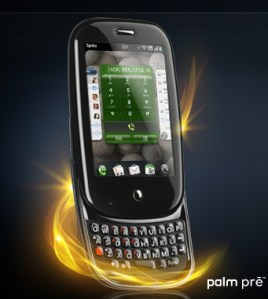
palm-pre

Pretty cool and sleek. Smaller than the iPhone with nice rounded edges. My guess is they have managed to keep the size down due to the 3mp camera (these are the major space eaters in mobiles). A capacitive touchscreen enables the use of gestures and multi-touch (ladies trim those fingernails if you want this phone). The slide-out qwerty keyboard distinguishes this from the iPhone giving peace of mind for those users who likeĀ  tactile feedback and the reassurance of physical hardware keys. The phone has a slight curve to it when the slider is open, which palm have marketed as ergonomic… I would say it looks nice but to claim that it is ergonomic? hmm….Ā 

UI:

The UI is very familiar (think iPhone). They have tried to keep all options hidden away to maximise what you see on the screen and declutter the interface. So within contacts there is just one nice big onscreen button to press to add a contact. Then when you select a contact there is a big edit button. Nice. You get the idea.

Surprisingly there is no option to ā€˜Save’ anything. I understand their reasoning for this and they believe this is a fantastic benefit, however, I know from observations in my previous user studies that ā€˜Save’ is important to users. We once changed this word to ā€˜Done’ and just that slight change caused users no end of problems. Saving is more about positive confirmation and peace of mind. We have been brought up in a world where you have to Save everything you do on a computer or a mobile, so it actually goes against the users’ mental model to not save. It will be very interesting to see how learnable this is – can we let go of this need to Save easily?Ā 

Gestures and interaction:

Interaction with the phone requires a mixture of gestures and pressing the only key on the front of the phone (they call this the ā€˜Centre key’). It is in the exact same location as the iPhone’s home key and what do you think this button does? I’m guessing you’re thinking it must be the panic button that all phones have (AKA red/home key that takes you back to the home screen), the ā€˜argh! I’m lost, I’m off back to the beginning’ key. Well they have chosen to go against the industry standard and instead, use this key for multitasking. From what I can see on the demo, the only way to get back ā€˜Home’ is to use the back gesture. Alarm bells started to ring with me when the guy demonstrating this gesture says that to go back he flicks back ā€œin the gesture area from right to left like I’m turning the page in a bookā€. Erm… hang on a minute…if you flick from right to left to turn a page you’re going forwards a page, not back to the previous page. It also feels easier and safer (more grip on the phone) to flick from left to right one-handed, using the thumb.

I quite like the swipe up gesture to get to the application menu. However, there is another swipe up gesture to get to your Wave dock (AKA Shortcuts) but with this gesture you have to make sure you drag slower and keep your finger on the screen until you have selected just underneath the item you want. This is quite a different interaction style to the rest of the phone as you aren’t selecting the item onscreen, rather, you are selecting just underneath the icon and it is when you lift your finger (deselect) that the selection activates (see the picture below, the white spot represents your finger). I think they may have been better combining the shortcuts with the application menu and visually make it clear that they are separate. Keep it simple guys. The Wave dock in action:

Shortcuts Menu - Drag up gesture

Other stuff:

Ok enough of the potential usability issues. Personally, I was really impressed with the Palm synergy functionality. This enables you to bring together all the information you have on a person from multiple places (Outlook, Facebook, Google) all into one place in your Contacts app. Simple!Ā 

The calendar has a small but cool feature that I liked. It compresses any empty space so that you can see for example an appointment you have at 9am and one at 7pm all on the same screen (assuming you have nothing inbetween).Ā 

The aggregated IM stuff sounds great, and how cool is it that you can start an IM chat with someone then when they go offline you can just change to texting them and it all shows in the same conversational messaging window!Ā 

To conclude, we must congratulate Mr Palm Pre for doing a really decent effort as an iPhone competitor. I’m still going to keep my fingers crossed for an iPhone Nano though. Please Mr Jobs… please…

Luv my Macbook

Ok my macbook isn’t spraypainted red, but I have to give it credit for being the best computer I have ever purchased. It has made me go ‘Wow!’ which to be honest I’m not even sure had happened between me and a computer before. I find screencapture really useful and the ability to drag and drop practically everything makes things so easy and quick. The universal search function is a godsend. I could take up a lot more lines talking about all of it’s amazing features but let me tell you a bit about why I converted.

I had a Windows Vista laptop before my mac and I had it only about 8 months before it unfortunately started to behave like all my other ex-windows machines, annoying me every time I logged on to carry out updates, virus checks, etc, etc. Then Windows Media decided it would only play the sound and not the visuals of any video files (no matter how many times I followed the link and installed the file required). I always felt it was an uphill struggle using Windows and Vista was a massive disappointment (just trying to do a shut down was so difficult to find! – how many ways do you need to turn a computer off??). So I welcomed my mac with open arms and hoped it would make my computer life much easier. It definitely has and I continue to be more and more impressed the longer I use it. Totally the opposite of my experience with Windows!

Creativity

ā€œTo design something really well you have to get it. You have to really grok what it’s all about. It takes a passionate commitment to thoroughly understand something — chew it up, not just quickly swallow it. Most people don’t take the time to do that. Creativity is just connecting things. When you ask a creative person how they did something, they may feel a little guilty because they didn’t really do it, they just saw something. It seemed obvious to them after awhile. That’s because they were able to connect experiences they’ve had and synthesize new things. And the reason they were able to do that was that they’ve had more experiences or have thought more about their experiences than other people have. Unfortunately, that’s too rare a commodity. A lot of people in our industry haven’t had very diverse experiences. They don’t have enough dots to connect, and they end up with very linear solutions, without a broad perspective on the problem. The broader one’s understanding of the human experience, the better designs we will haveā€

— Steve Jobs, Wired (March, 1996)